IFC models you can turn, cut away and question
Two building models, drawn by NativeBIM's own geometry engine from their IFC files. Ask one of the questions and the model shows you the elements behind the answer, each with its IFC GlobalId. Click any element to read its property sets.
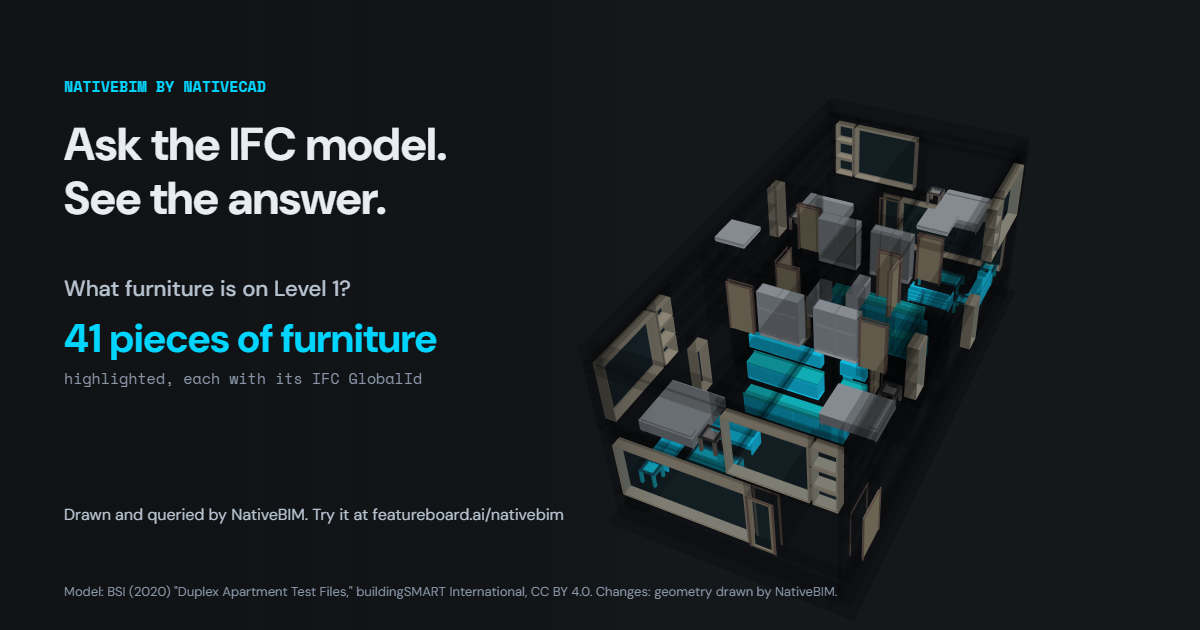
Loading the model…
Drag to orbit · scroll or pinch to zoom · right-drag to pan · click an element
Tilt-up panel schedule
This model
How this page was made
- NativeBIM opened each IFC file with its own reader and checked every product: each one is either drawn or listed under "Not drawn" with the reason NativeBIM's geometry engine gave.
- NativeBIM evaluated the geometry, cut the door and window openings and wrote the result as glTF. No other software touched the models.
- Each question was answered by NativeBIM's selector query, the query shown under the answer. The highlighted elements are exactly the ones the query returned.
- Property sets, quantities and materials were read from the IFC files and are shown in each model's own units. Built .
Notices
NativeBIM is licensed software. It does not provide design, engineering or other professional services. Outputs are drafts for review by the licensed professional of record.
Industry Foundation Classes, IFC and ifcXML are trademarks of buildingSMART International Limited. The 3D view is rendered with the three.js library. NativeBIM is not affiliated with, endorsed by or sponsored by the companies and organizations named here. Product names and marks belong to their owners.
NativeBIM is provided as is, without warranty of any kind. To the extent the law allows, FeatureBoard Labs Incorporated is not liable for indirect, incidental or consequential damages, lost profits or lost data, and its total liability is limited to the license fees paid in the 12 months before the claim. Read the license.