NativeBIM / Demos / Add a room
NativeBIM by NativeCAD
IFC floor plan, edited: can I just add a room?
Roopinder Tara, Editor in Chief of ENGtechnica, asked in a public post why CAD can't just add a room, move a door or make it a sliding door. We modeled the floor plan from his post as an IFC model and ran his list as edits in NativeBIM. Each edit is checked before it is applied, and each can be undone.
The plan, before and after
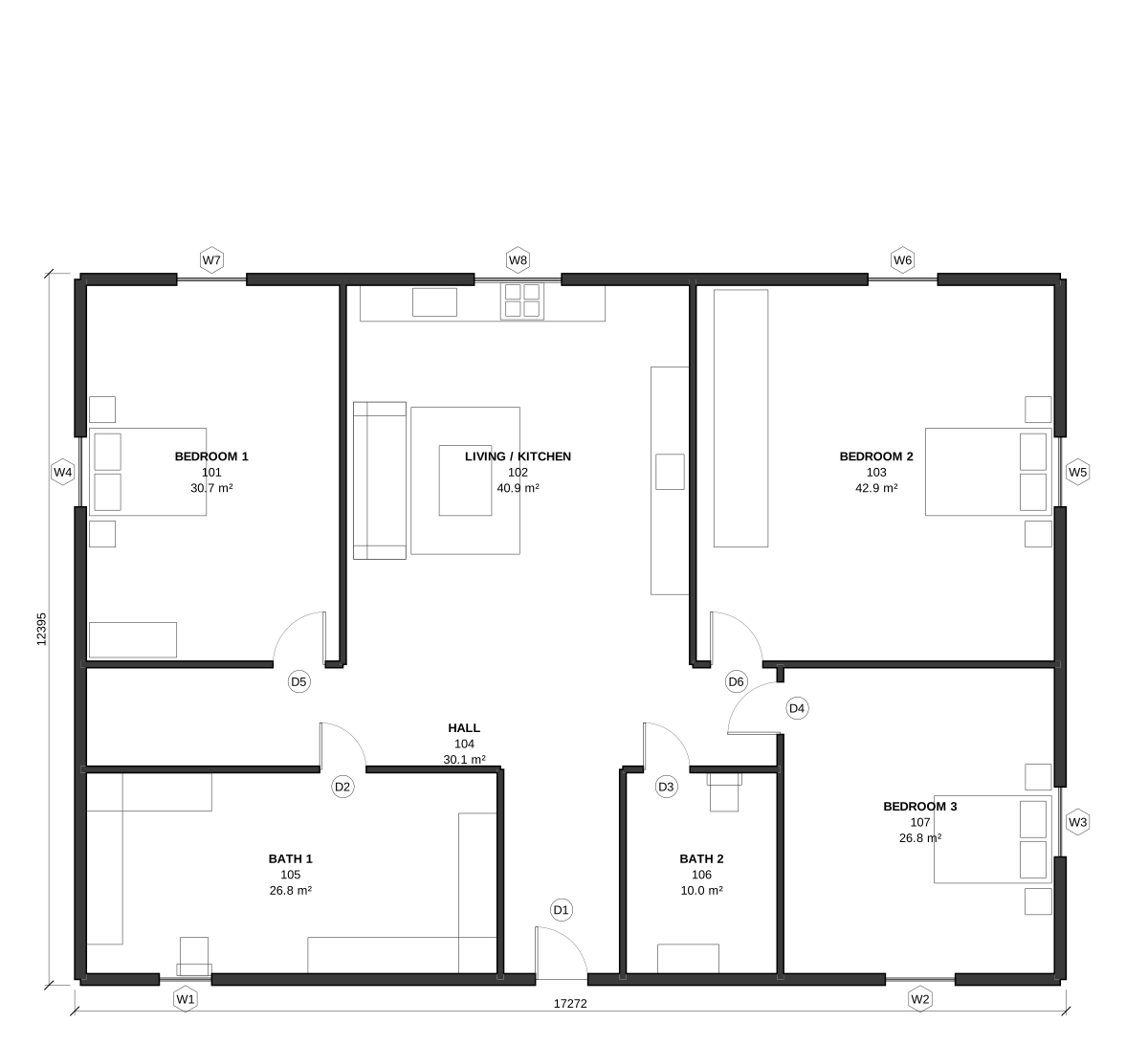
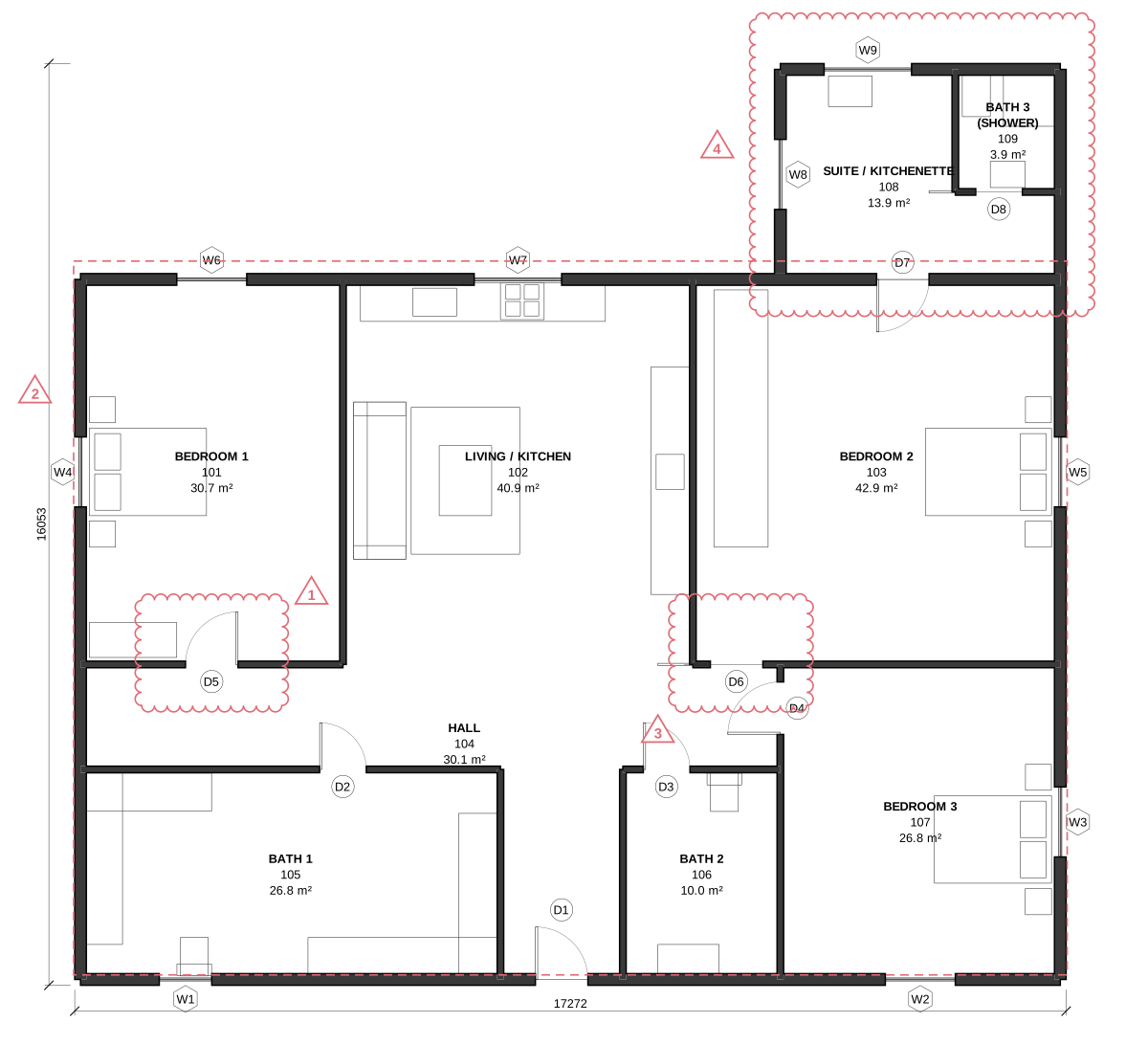
The model in 3D
Orbit the house as drawn in the post and after the edits, switch to the plan or cutaway, and pick any element to see what the model says about it. The questions highlight the elements NativeBIM's selector returned.
The 3D view loads when it scrolls into view. It is the 3D viewer with these two models, drawn by NativeBIM from the IFC files the demo script wrote and converted to glTF. NOT FOR CONSTRUCTION.
His list, one edit each
Each call is what NativeBIM ran, in feet. NativeBIM previews the change, checks the model against the IFC schema and its relationship rules, and applies it only if nothing breaks.
-
“Move the door to here.”
The Bedroom 1 door moves from the corner to the middle of its wall. The opening moves with it.
{ "op": "moveOpening", "where": { "type": ["IfcDoor"], "name": "D-02" }, "offset": 7.5 }One operation in one edit; 0 new validation issues; undoable. Run with
docs/launch/site/add_a_room.js(method). -
“Indicate an outside wall.”
The four perimeter walls are marked exterior in the IFC property that energy, code and quantity tools read, Pset_WallCommon.IsExternal. It is a fact about the wall, not a line style.
{ "op": "setProperty", "where": { "type": ["IfcWall"], "name": "EXT-" },
  "pset": "Pset_WallCommon", "name": "IsExternal", "value": true }
One operation in one edit; 0 new validation issues; undoable. Run with
docs/launch/site/add_a_room.js(method). -
“Change the door to a sliding door.”
Bedroom 2's swing door becomes a slider by one attribute. It stays the same door, with the same GlobalId and opening; the plan swaps the swing for a sliding panel.
{ "op": "setAttribute", "where": { "type": ["IfcDoor"], "name": "D-03" },
  "name": "OperationType", "value": "SLIDING_TO_LEFT" }
One operation in one edit; 0 new validation issues; undoable. Run with
docs/launch/site/add_a_room.js(method). -
“Add a small bathroom with a shower, no bath? Add a small kitchenette?”
A 16 ft by 12 ft suite goes on north of Bedroom 2, with a shower bath and a kitchenette, as one edit: five walls, a floor slab, two rooms, a door from Bedroom 2 where its window was, a sliding bath door, three windows and four plumbing fixtures. The doors are cut into walls the same edit creates.
[{ "op": "addWall", "start": [40, 40], "end": [40, 52], "thickness": 0.667, "height": 9, "label": "SUITE-West", "isExternal": true },
 { "op": "addWall", "start": [40, 52], "end": [56, 52], "thickness": 0.667, "height": 9, "label": "SUITE-North", "isExternal": true },
 { "op": "addWall", "start": [56, 52], "end": [56, 40], "thickness": 0.667, "height": 9, "label": "SUITE-East", "isExternal": true },
 { "op": "addSlab", "points": [[40,40],[56,40],[56,52],[40,52]], "thickness": 0.5, "label": "SUITE floor" },
 { "op": "addSpace", "points": [[40,40],[56,40],[56,45],[50,45],[50,52],[40,52]], "height": 9,
   "label": "108", "longName": "Suite / Kitchenette" },
 { "op": "addDoor", "host": "EXT-North", "offset": 9, "width": 3, "height": 6.667, "label": "D-07 Suite" },
 ... 12 more: the bath walls and room, the window removed, the bath door, three windows, four fixtures]
18 operations in one edit, 17 elements created; 0 new validation issues; undoable. Run with
docs/launch/site/add_a_room.js(method).
The rooms, from the model
Net areas NativeBIM measured from each room's geometry after the edits. The new suite adds 192 ft².
| No. | Room | Net area |
|---|---|---|
| 101 | Bedroom 1 | 330 ft² |
| 102 | Living / Kitchen | 440 ft² |
| 103 | Bedroom 2 | 462 ft² |
| 104 | Hall | 324 ft² |
| 105 | Bath 1 | 288 ft² |
| 106 | Bath 2 | 108 ft² |
| 107 | Bedroom 3 | 288 ft² |
| 108 | Suite / Kitchenette added | 150 ft² |
| 109 | Bath 3 (shower) added | 42 ft² |
Total, after Measured with docs/launch/site/add_a_room.js (method) | 2,432 ft² |
The dimensions in the post's plan don't add up
He said so too. Each dimension string sums to something other than its overall dimension: the top string is 15 + 20 + 10 + 12 = 57 ft under a 12'-0" overall, the left 4 + 16 + 14 + 14 = 48 ft under 40'-0", the right 8 + 14 + 10 = 32 ft under 46'-0", and the bottom 14 + 4 + 3 + 6 + 16 = 43 ft under 40'-0". We modeled the house at the drawing's own proportions instead, 56 ft by 40 ft, with the same rooms and furniture in the same places.
How it was checked
- All 5 edits passed the validation gate with 0 new issues; the final model has 0 errors.
- The model exports as IFC4 with 0 validation errors.
- The room edit created 17 elements in one transaction; one undo removes all of them. Run with
docs/launch/site/add_a_room.js(method)
What this does not do yet: the house's starting walls, rooms and furniture were traced from the post's plan with data/add-a-room/build_base.py (IfcOpenShell); NativeBIM made every change after that. Plumbing fixtures are simple boxes for layout. An L-shaped room's tag sits at its centre and can overlap a wall. Roofs, columns and new stories cannot be created by an edit yet.
Reproduce it
python docs/launch/site/data/add-a-room/build_base.py docs/launch/site/data/add-a-room/house-base.ifc
node docs/launch/site/add_a_room.js
The Python line needs IfcOpenShell. The second runs every edit through this repository's MCP server and writes run.json and the two sheets. Units in the calls are feet (units: "imperial").
Notices
NativeBIM is licensed software. It does not provide design, engineering or other professional services. Outputs are drafts for review by the licensed professional of record.
Sheets are marked NOT FOR CONSTRUCTION by default.
NativeBIM is not affiliated with, endorsed by or sponsored by the companies and organizations named here. Product names and marks belong to their owners.
IFC and Industry Foundation Classes are marks of buildingSMART International.
NativeBIM is provided as is, without warranty of any kind. To the extent the law allows, FeatureBoard Labs Incorporated is not liable for indirect, incidental or consequential damages, lost profits or lost data, and its total liability is limited to the license fees paid in the 12 months before the claim. Read the license.