NativeBIM / Demos / Drawing to model
NativeBIM by NativeCAD
IFC from a 2D floor plan: walls, doors, windows and rooms read from a DXF
Many existing buildings are documented in drawings, not models. NativeBIM reads a DXF floor plan, finds the walls with their thickness, the doors and windows in them and the rooms they enclose, and builds an IFC4 model from what it found. To show how well that works, each plan here was cut from a published model, so every wall, door and room the software reads can be scored against the one it came from.
What it reads
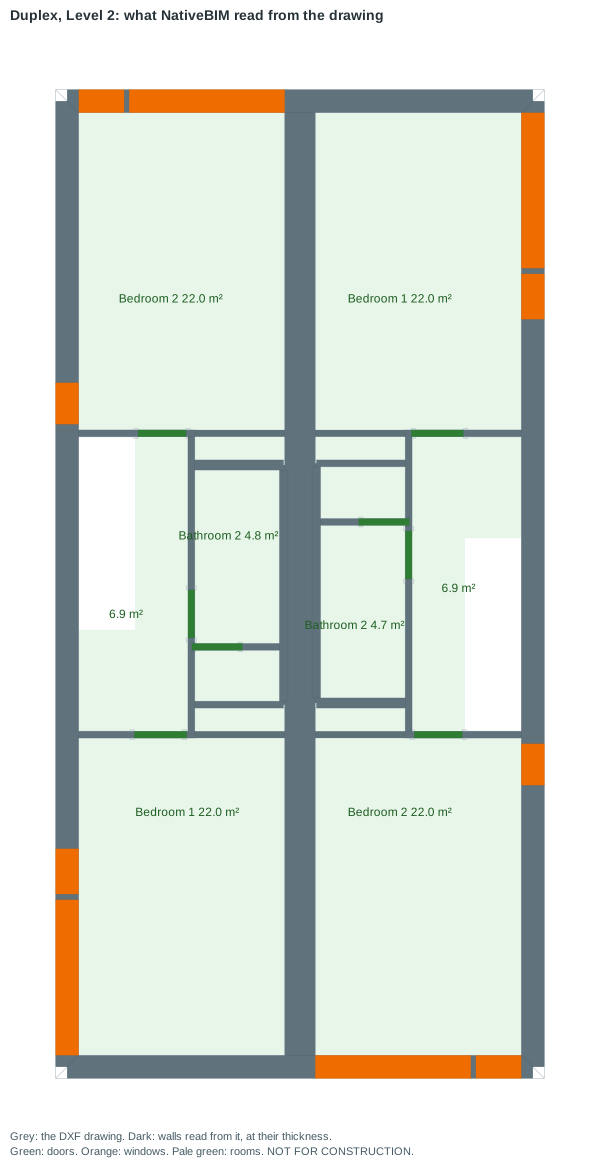
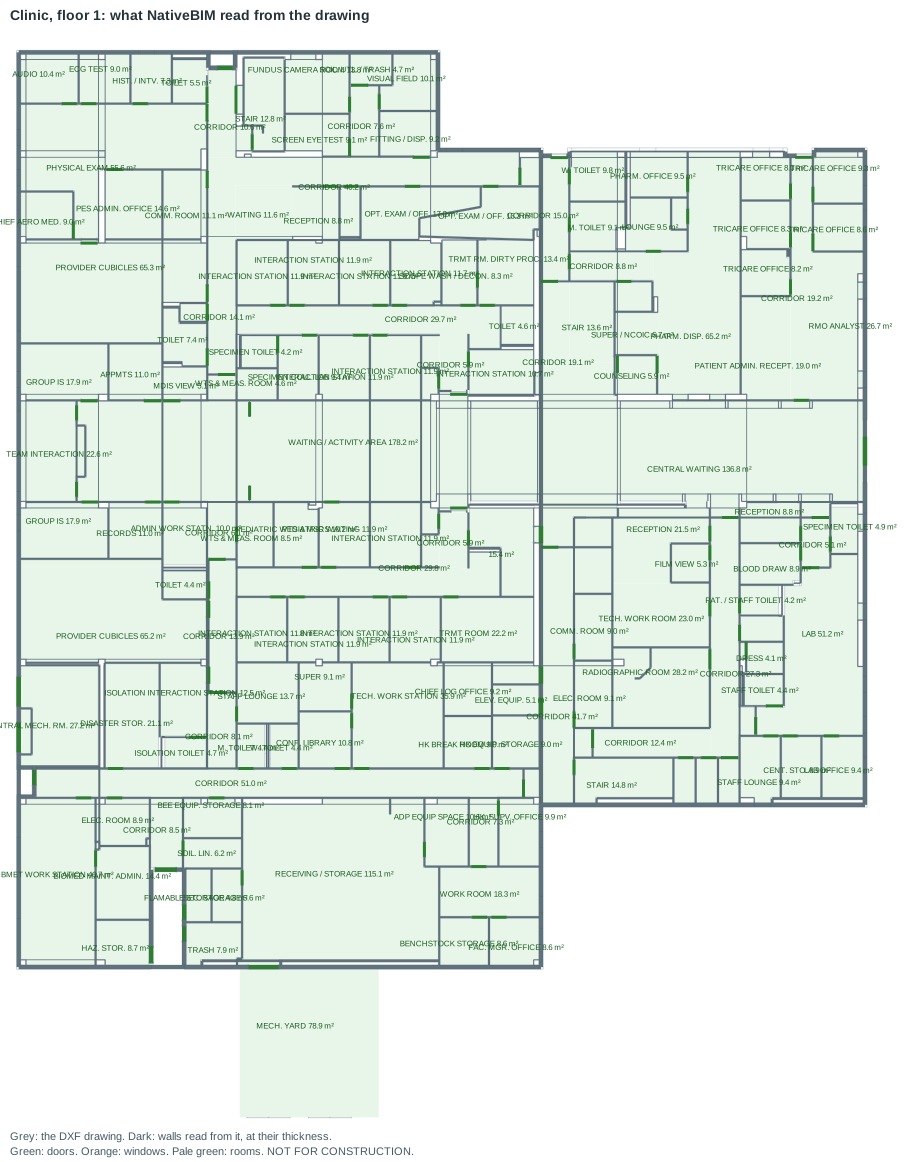
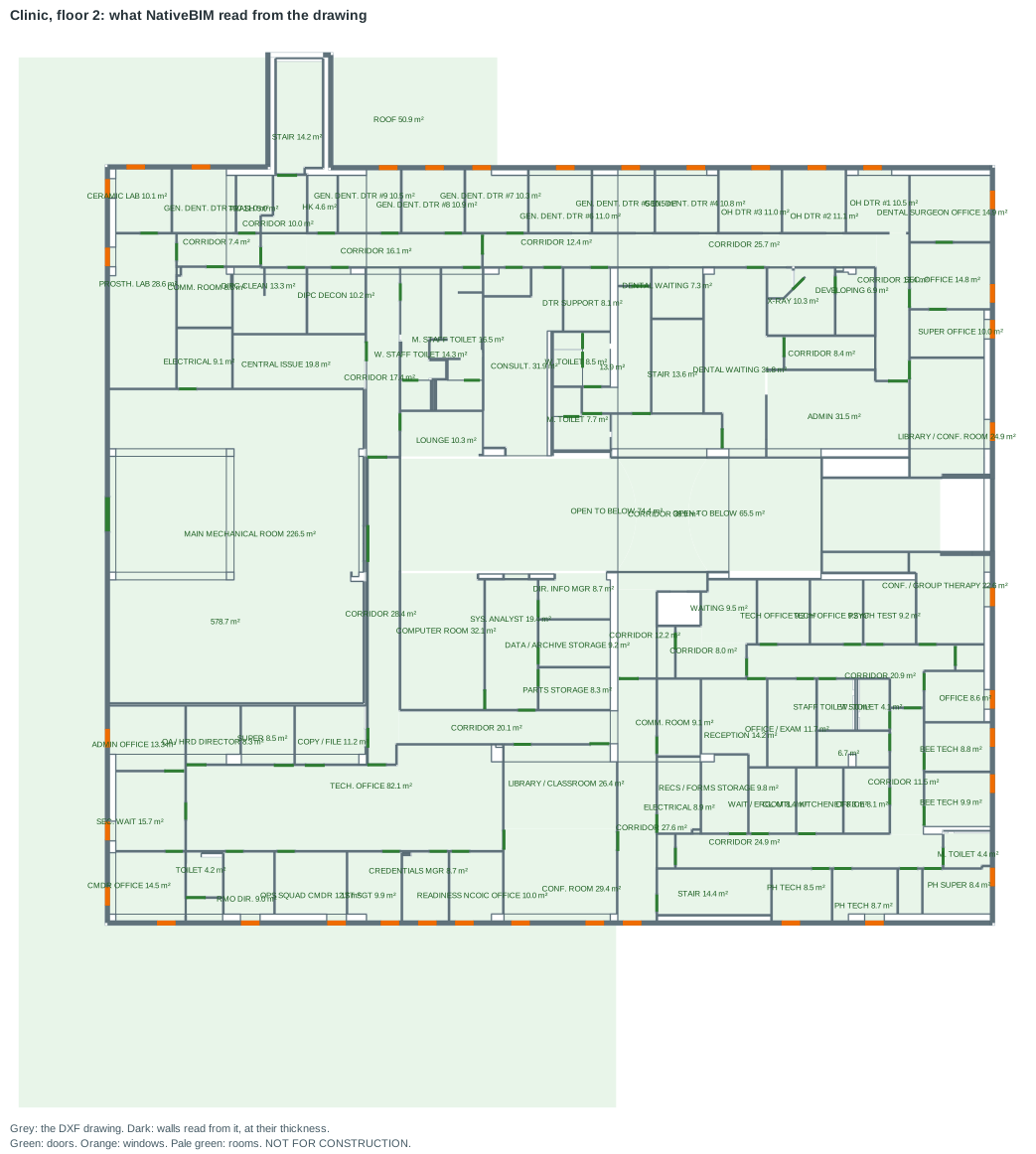
docs/launch/site/capture_drawings.js (method). BSI (2020) "Duplex Apartment Test Files," buildingSMART International, CC BY 4.0; cut to a 2D floor plan by NativeBIM, read back and rebuilt.Two more figures, for the larger plan: Clinic, floor 1 and Clinic, floor 2 (each a few hundred KB).
How well it reads
Each plan was cut from a published IFC model at 1.2 m above the floor by tools/recognize/plan_dxf.js, and written as a DXF on the usual AIA/NCS layers (walls, doors, glazing, columns, room outlines and names), the kind of drawing a design office hands an owner. The recognizer reads it back and tools/recognize/score.js compares what it found with the model.
| Plan | Drawing lines | Wall overlap (IoU) | Wall area found | Doors and windows found | Of those found, right | Rooms from walls alone (IoU) | Source |
|---|---|---|---|---|---|---|---|
| Duplex, Level 1 | 296 | 0.95 | 97.6% | 10 of 10 | 100.0% | 0.40 | Measured with docs/launch/site/capture_drawings.js (method) |
| Duplex, Level 2 | 460 | 0.88 | 90.2% | 18 of 18 | 100.0% | 0.92 | Measured with docs/launch/site/capture_drawings.js (method) |
| Clinic, floor 1 | 6,072 | 0.86 | 92.6% | 147 of 149 | 100.0% | 0.81 | Measured with docs/launch/site/capture_drawings.js (method) |
| Clinic, floor 2 | 4,280 | 0.94 | 96.6% | 132 of 132 | 100.0% | 0.78 | Measured with docs/launch/site/capture_drawings.js (method) |
| Generated warehouse | n/a | 1.00 | 100.0% | 116 of 116 | 100.0% | 0.99 | Measured with docs/launch/site/capture_drawings.js (method) |
- Wall overlap is the intersection over union of the wall area the software found and the wall area in the model, on a fine grid: 1.00 means the two are the same. Wall area found is the share of the model's wall area the recognized walls cover. Measured with
docs/launch/site/capture_drawings.js(method). - Doors and windows found counts the model's doors and windows that have one recognized within 0.5 m, of the same kind; of those found, right is the share of recognized ones that match one in the model. On floor 1 of the Clinic the 2 it missed are 2.7 m chain-link double gates set in a curtain wall, which is drawn as single lines and not read as a wall. Measured with
docs/launch/site/capture_drawings.js(method). - Rooms from walls alone is the mean overlap of each room in the model with the room traced from the walls, with the room-outline layer removed from the drawing. With that layer present the mean overlap is 1.00, 1.00, 1.00, 1.00 on the four plans, in the order of the table. Level 1 of the Duplex scores 0.40 because its living, dining and kitchen are one open space with no walls between them: the model divides it into rooms that a plan without room outlines does not show. Measured with
docs/launch/site/capture_drawings.js(method). - The Clinic model has 5 doors on floor 1 modelled twice in the same place; each pair is counted once. Measured with
docs/launch/site/capture_drawings.js(method).
The model it builds
tools/recognize/dxf_to_ifc.js builds an IFC4 model from the drawing alone: one wall type per thickness found, walls on their centre lines, doors and windows hosted in them, a space for each room and a floor slab on the outline. It reads the file back and checks it against the EXPRESS rules of the schema.
| Plan | Walls | Wall types | Doors | Windows | Spaces | Rule violations | Elements not built | Source |
|---|---|---|---|---|---|---|---|---|
| Duplex, Level 1 | 21 | 7 | 6 | 4 | 10 | 0 | 0 | Built and checked with docs/launch/site/capture_drawings.js (method) |
| Duplex, Level 2 | 19 | 6 | 8 | 10 | 10 | 0 | 0 | Built and checked with docs/launch/site/capture_drawings.js (method) |
| Clinic, floor 1 | 468 | 18 | 147 | 0 | 154 | 0 | 0 | Built and checked with docs/launch/site/capture_drawings.js (method) |
| Clinic, floor 2 | 320 | 15 | 96 | 36 | 109 | 0 | 0 | Built and checked with docs/launch/site/capture_drawings.js (method) |
A floor plan has no heights. These are assumptions, written into the model's project description: stories 3 m, doors 2.1 m, windows 1.5 m from a 0.9 m sill, slab 0.2 m. Gaps in a wall with no door or window drawn in them stay gaps in the wall. Materials are recorded as unspecified. The Clinic's floor 1 has no windows because its glazing is curtain wall, which the recognizer does not read yet. Any element the builder refuses is listed in the script's report with the reason; none was refused on these plans.
The rebuilt model in 3D
Both Duplex plans, and both Clinic plans, rebuilt as one IFC4 model per building from the drawings alone and drawn by NativeBIM's geometry engine. The "Duplex apartment" tab is the model the plans were cut from, so you can compare the two. Drag to orbit, use "Story by story" to step through the levels, and click an element to read what the drawing gave it. The heights are the assumptions above.
The 3D view loads when it scrolls into view. It is the 3D viewer with these models; the rebuilt models are built by docs/launch/viewer/build-viewer.js with tools/recognize/dxf_to_ifc.js. Models: BSI (2020) "Duplex Apartment Test Files," buildingSMART International, CC BY 4.0 and BSI (2020) "Medical-Dental Test Files," buildingSMART International, CC BY 4.0; cut to DXF floor plans by NativeBIM, rebuilt as IFC4 from the drawings and converted to glTF. NOT FOR CONSTRUCTION.
What it does not do yet
- Curved walls are reported and skipped; a curtain wall drawn as single lines is not a wall pair and is not read as one.
- Layer names are read by the AIA/NCS convention and common variants (
A-WALL,WALLS,A-GLAZ,WINDOWS). A drawing with every line on one layer is not read. - Scanned drawings and PDFs are not read: the input is a DXF with real lines. Plans exported from another program have not been scored here, because there is no published set of such drawings with a model to compare against.
- One story per drawing. Stairs, furniture and dimensions are ignored.
Models
- BSI (2020) "Duplex Apartment Test Files," buildingSMART International, CC BY 4.0. Changes made: cut to a 2D floor plan by NativeBIM, read back and rebuilt. Source repository
- BSI (2020) "Medical-Dental Test Files," buildingSMART International, CC BY 4.0. Changes made: cut to a 2D floor plan by NativeBIM, read back, re-planned as office space. Source repository
- The warehouse is generated by NativeBIM (
tests/authoring/builder/warehouse_sample.js).
Reproduce it
node tools/corpus/fetch.js --id community-duplex-arch
node tools/corpus/fetch.js --id community-clinic-arch
node docs/launch/site/capture_drawings.js
node tools/recognize/plan_dxf.js corpus/community-duplex-arch/<file>.ifc --storey "Level 2" --out level2.dxf
node tools/recognize/dxf_to_ifc.js level2.dxf --report level2.json
docs/launch/site/capture_drawings.js writes docs/launch/site/data/drawings.json and the figures; --check confirms they are current. Recognition is deterministic: the same drawing gives the same walls, and the same model GlobalIds.
Notices
NativeBIM is licensed software. It does not provide design, engineering or other professional services. Outputs are drafts for review by the licensed professional of record.
Sheets are marked NOT FOR CONSTRUCTION by default.
NativeBIM is not affiliated with, endorsed by or sponsored by the companies and organizations named here. Product names and marks belong to their owners.
IFC and Industry Foundation Classes are marks of buildingSMART International.
NativeBIM is provided as is, without warranty of any kind. To the extent the law allows, FeatureBoard Labs Incorporated is not liable for indirect, incidental or consequential damages, lost profits or lost data, and its total liability is limited to the license fees paid in the 12 months before the claim. Read the license.