Suppliers handling controlled technical data are told two things at once: adopt AI to keep up, and do not let the drawings leave the building. Most AI design tools are cloud services, which ends the conversation. NativeCAD is CAD, FEA and CFD software that an AI assistant drives, and it runs on your own machines. The kernel, the solvers and the licence check all work with the network cable pulled.
What regulated teams do with NativeCAD
- Run AI-driven CAD inside an accredited boundary with a model hosted in that boundary.
- Keep geometry on your infrastructure. The software has no route to the internet.
- Map responsibilities for CMMC Level 2 with a published control map.
- Release model-based definition as STEP AP242 with PMI and 3D PDF.
- License without a phone-home. Validation is fully offline.
Zero routes to the internet
NativeCAD for defense describes the deployment: 0 routes from NativeCAD to the internet, driven by Claude on Amazon Bedrock inside AWS GovCloud. The assistant that builds your parts is a model endpoint inside the same boundary as the data. The GovCloud deployment guide is the reference architecture to hand your infrastructure team.
A CMMC Level 2 responsibility map
The CMMC Level 2 / NIST SP 800-171 responsibility map goes control by control and states who is responsible: the software, the hosting environment or your organisation. It is the document your compliance lead will ask for first, and it is published.
Licensing that works in an enclave
Per the pricing page, validation is fully offline, with no phone-home and no runtime kill-switch. Pricing is flat per seat, with no metered agent compute and no usage component, so there is no usage telemetry to approve. For products that embed the kernel, the AI-native kernel page puts it this way: your customers' geometry never leaves your infrastructure.
The engineering is the same inside the boundary
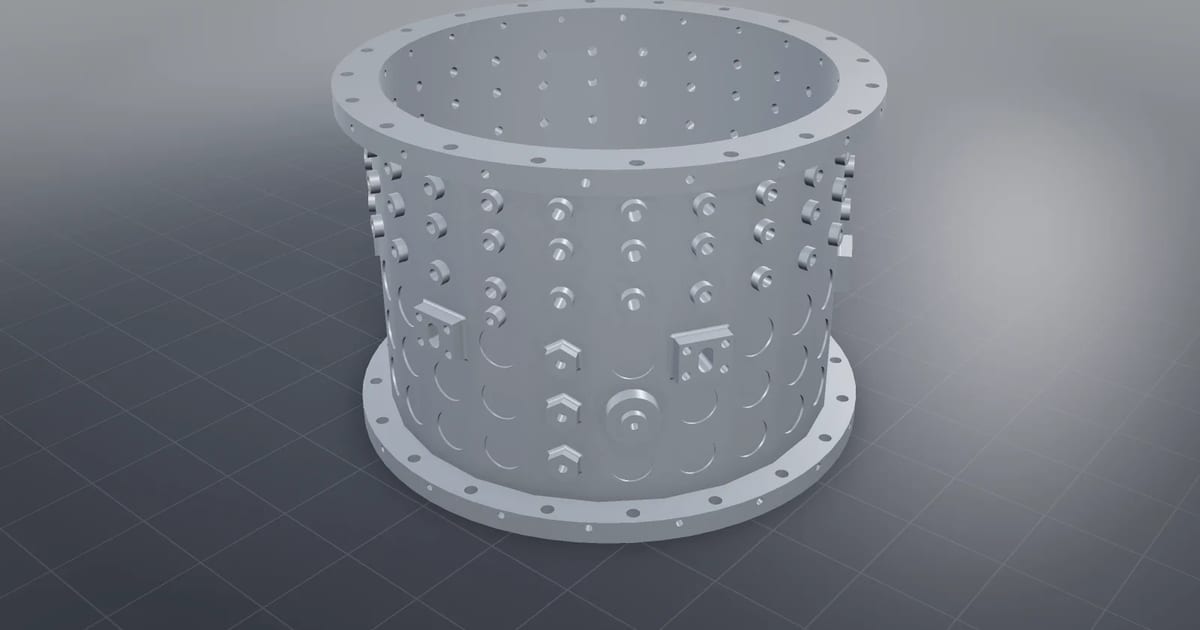
NativeCAD does the same engineering inside the boundary as outside it. Examples from the public demos: the turbine blade checked by four solvers, the compressor casing with 158 holes in one watertight solid, metal AM build prep in 116 s, and tolerance stacks and fastener audits on a full transaxle. See NativeCAD for aerospace and turbomachinery for the full list.
Model-based definition for the supply chain
NativeCAD reads and writes STEP AP242, where 150 of 150 exported files were read exactly by an independent CAD kernel, and writes 3D PDF for suppliers and inspectors without a CAD seat. Product manufacturing information is authored on the model, so the drawing and the solid do not drift apart.
How a deployment usually starts
1. Read the GovCloud deployment guide and the CMMC responsibility map.
    2. Stand NativeCAD up in a test enclave with a boundary-hosted model.
    3. Run your own acceptance part: import, modify, check, export STEP with PMI.
    4. Decide on seats, or on the Kernel SDK if you are embedding it in a product.
Book a call to talk through your boundary and what your assessor will need.
Questions defense and regulated manufacturers ask
Can NativeCAD run in an air-gapped or GovCloud environment?
Yes. NativeCAD has no route to the internet and validates its licence offline. The published reference deployment drives it with Claude on Amazon Bedrock inside AWS GovCloud.
Is there CMMC documentation for NativeCAD?
Yes. A CMMC Level 2 / NIST SP 800-171 responsibility map is published, stating for each control whether the software, the hosting environment or your organisation is responsible.
What does NativeCAD cost?
A NativeCAD MCP / Modeler seat is $200 per seat per year, or $20 per seat per month, with no metered usage. The evaluation needs no key and no sign-up; export, save and import need a seat key. See pricing.
Does my geometry leave my computer?
NativeCAD runs on your own machine: the kernel and solvers run locally and licence validation is fully offline. Files opened in the browser modeler are never uploaded. Your AI assistant sees what you ask it to work on, under your agreement with its provider.
NativeCAD in other industries
- NativeCAD for Drone Manufacturers: Airframe, Airflow and Every Revision Checked
- NativeCAD for Automotive: Drivelines, Tolerance Stacks and Thermal Parts Your AI Can Check
- NativeCAD for Motorsport: More Design Iterations Between Races
- NativeCAD for Aerospace and Turbomachinery: Blades, Casings and Qualification Reports
- NativeCAD for Robotics and Weld Cell Integrators: Program the Cell From the CAD Model
- NativeCAD for CNC Job Shops: From the Customer's Drawing to a Checked Solid
- NativeCAD for Sheet Metal Fabricators: Flat Patterns, Bend Checks and Drawings by Conversation
- NativeCAD for Metal Additive Manufacturing: Design for the Printer, Then Prove the Part
- NativeCAD for 3D Printing Services and Product Designers: Fuller Builds, Parts That Work Off the Bed
- NativeCAD for Foundries and Casting: Part In, Mould Out
- NativeCAD for Electronics Hardware Teams: Check the Board and Fit the Enclosure Before You Build
- NativeCAD for Furniture Makers and Woodworkers: A Desk Designed in Ten Messages
- NativeCAD for Game Studios and 3D Asset Teams: Engineering-Grade Models as Runtime Assets
- NativeCAD for Simulation Teams: FEA and CFD Set Up and Run by the Agent That Built the Part
NativeCAD is CAD, FEA and CFD software your AI assistant drives over MCP, from Claude, Cursor or your own agent, and in the browser. Every part is an exact B-rep solid that exports as STEP AP242. See what it does, browse every demo, check pricing, or install it.