Sheet metal work arrives as a rough sketch, a customer model that ignores bend radius, or a DXF someone drew by eye. The fabricator fixes it, unfolds it, checks it against the tooling and draws it up. NativeCAD is CAD software driven by your AI assistant, with sheet metal tools built in: folds, flanges, hems, louvres, corner reliefs, flat patterns and cut-path export.
What fabricators do with NativeCAD
- Get the flat pattern with the bend allowance worked out from thickness and K-factor.
- Check the part against shop rules: bend radius, hole-to-bend distance, flange length.
- Export DXF and cut paths for the laser, and STEP for the customer.
- Produce the drawing sheet without drafting it by hand.
- Turn a customer DXF into a solid to check fit before cutting.
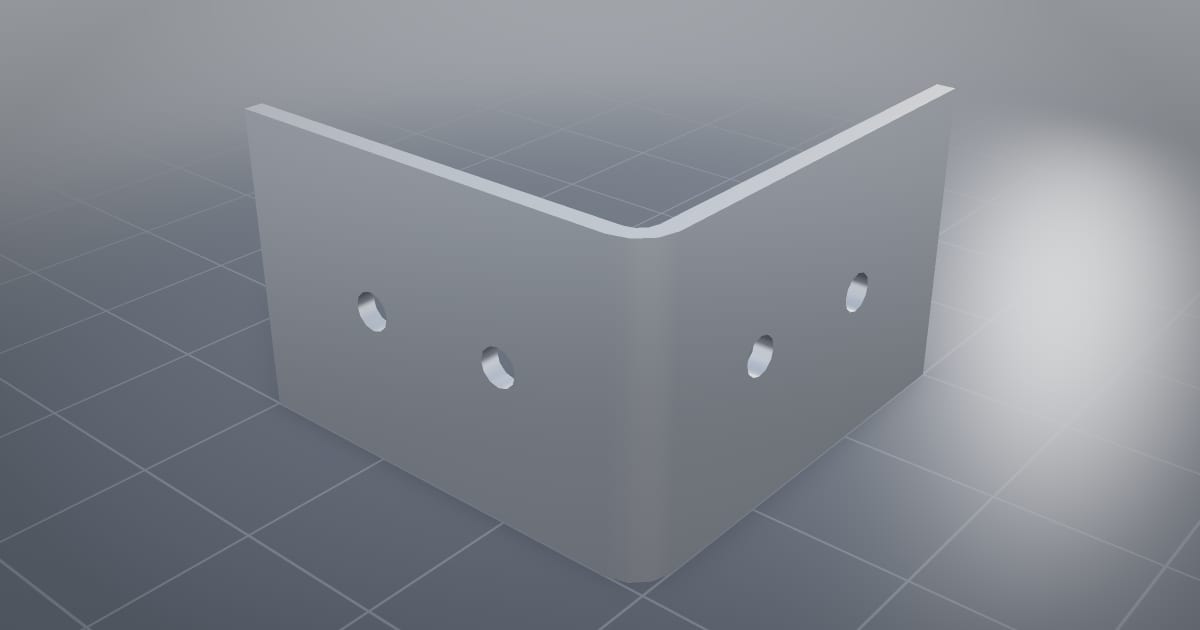
An L-bracket, modelled and unfolded by an AI assistant
The L-bracket demo is a 3 × 3 × 2 inch bracket, 0.125 thick, with four Ø0.250 through holes, modelled by Claude driving NativeCAD. It unfolds to a 5.775 × 2 in blank at K-factor 0.4. You can turn the part in the 3D viewer.
A wrong bend radius caught and cleared
The drawing and manufacturing check takes the same bracket through vendor rule packs. They catch a wrong bend radius, one rebuild clears it, and a single call emits an A3 third-angle drawing sheet. Nothing on that page was drawn or typed by hand. The design review packet is what you would send back to the customer.
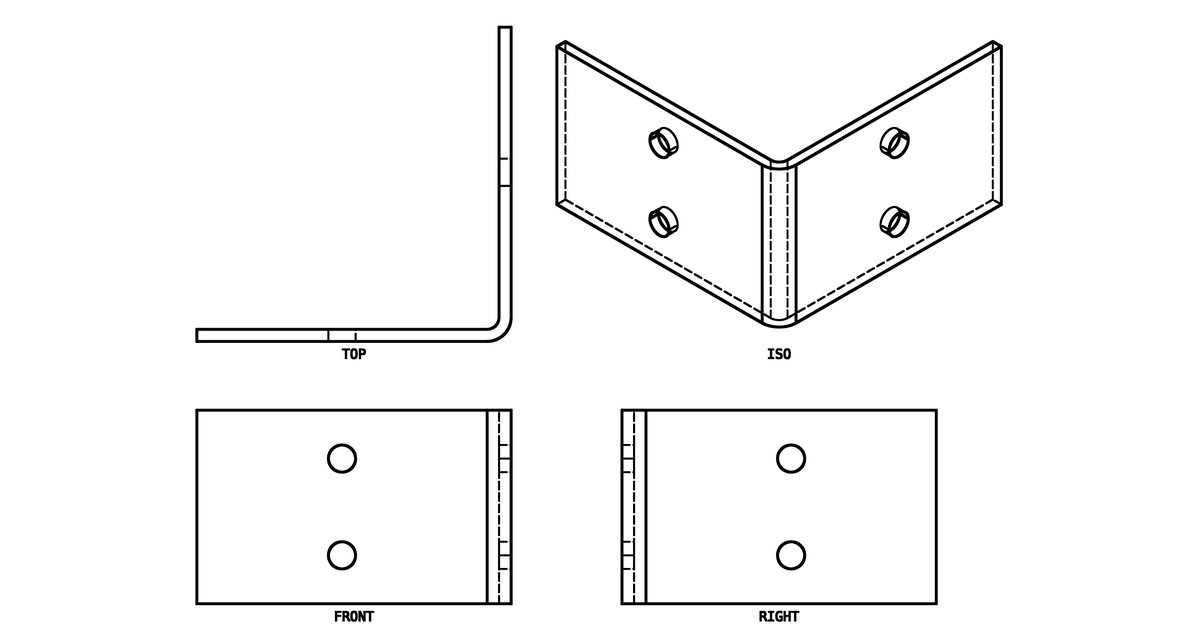
Customer sends a bracket with a bend radius your tooling cannot make. The assistant flags it, rebuilds the part at the radius you stock, shows the new flat length and issues the drawing. You approve it instead of doing it.
Louvres, beads, hems and jogs
Open the sheet metal half-door in the live modeler: louvres, beads, a hem, a jog, the flat pattern and DXF export on one part. The thickened bracket starts from a surface and becomes sheet.
DXF and PDF in, DXF and cut paths out
Drawing import takes a DXF or vector PDF and returns a solid and a STEP file, with holes as true cylinders and arcs as true arcs. Going the other way, the drawings interop page covers DXF, PDF drawings, SVG and cut paths.
Checks that close on their own
The DFM design loop covers sheet metal alongside machining, moulding and additive: 8 of 8 parts pass in three iterations or fewer, with every fix coming from the checker. The DFM knowledge packs include a sheet-metal pack.
What to ask your assistant
Make a U-channel 400 long, 60 wide, 40 legs in 2 mm mild steel and give me the flat pattern.
    Check this part against a 3 mm minimum bend radius and move any hole that is too close to a bend.
    Export the flat as DXF and the folded part as STEP.
    Make an A3 drawing with bend lines and overall dimensions.
Questions sheet metal fabricators ask
Can NativeCAD generate a sheet metal flat pattern?
Yes. NativeCAD unfolds sheet metal parts using thickness and K-factor and exports the flat as DXF. The public L-bracket demo unfolds to a 5.775 × 2 in blank at K-factor 0.4.
Does it check bend radius and hole-to-bend distance?
Yes. Manufacturing rule packs check the part and name the fix. In the L-bracket example a wrong bend radius is caught and cleared with one rebuild.
What does NativeCAD cost?
A NativeCAD MCP / Modeler seat is $200 per seat per year, or $20 per seat per month, with no metered usage. The evaluation needs no key and no sign-up; export, save and import need a seat key. See pricing.
Does my geometry leave my computer?
NativeCAD runs on your own machine: the kernel and solvers run locally and licence validation is fully offline. Files opened in the browser modeler are never uploaded. Your AI assistant sees what you ask it to work on, under your agreement with its provider.
NativeCAD in other industries
- NativeCAD for Drone Manufacturers: Airframe, Airflow and Every Revision Checked
- NativeCAD for Automotive: Drivelines, Tolerance Stacks and Thermal Parts Your AI Can Check
- NativeCAD for Motorsport: More Design Iterations Between Races
- NativeCAD for Aerospace and Turbomachinery: Blades, Casings and Qualification Reports
- NativeCAD for Robotics and Weld Cell Integrators: Program the Cell From the CAD Model
- NativeCAD for CNC Job Shops: From the Customer's Drawing to a Checked Solid
- NativeCAD for Metal Additive Manufacturing: Design for the Printer, Then Prove the Part
- NativeCAD for 3D Printing Services and Product Designers: Fuller Builds, Parts That Work Off the Bed
- NativeCAD for Foundries and Casting: Part In, Mould Out
- NativeCAD for Electronics Hardware Teams: Check the Board and Fit the Enclosure Before You Build
- NativeCAD for Furniture Makers and Woodworkers: A Desk Designed in Ten Messages
- NativeCAD for Game Studios and 3D Asset Teams: Engineering-Grade Models as Runtime Assets
- NativeCAD for Simulation Teams: FEA and CFD Set Up and Run by the Agent That Built the Part
- NativeCAD for Defense and Regulated Manufacturing: AI-Built Parts Inside Your Own Boundary
NativeCAD is CAD, FEA and CFD software your AI assistant drives over MCP, from Claude, Cursor or your own agent, and in the browser. Every part is an exact B-rep solid that exports as STEP AP242. See what it does, browse every demo, check pricing, or install it.