Interoperability · Drawings: DXF / SVG / PDF
2D — wireframes, cut paths, and DXF and PDF drawings in
Two very different 2D outputs, deliberately kept apart: a quick wireframe projection for visual reference, and contour-DXF — the file you actually send a laser, waterjet or plasma vendor, taken straight off the B-rep rather than off a mesh. And the read side: a DXF in, as a 2D sketch or an exact flat part, and a vector PDF drawing in, read exactly as the drawing it is. And shop-ready drawings out: every dimension toleranced, GD&T on the holes that matter, one title and tolerance block per supplier.
New · Shop-ready drawings
Every dimension toleranced — shop-ready drawings
Send a shop a sheet it can quote without picking up the phone. NativeCAD puts a tolerance on every dimension, calls out the mounting holes for the screws that go through them, and stamps the same title and tolerance block on every drawing you send that supplier.
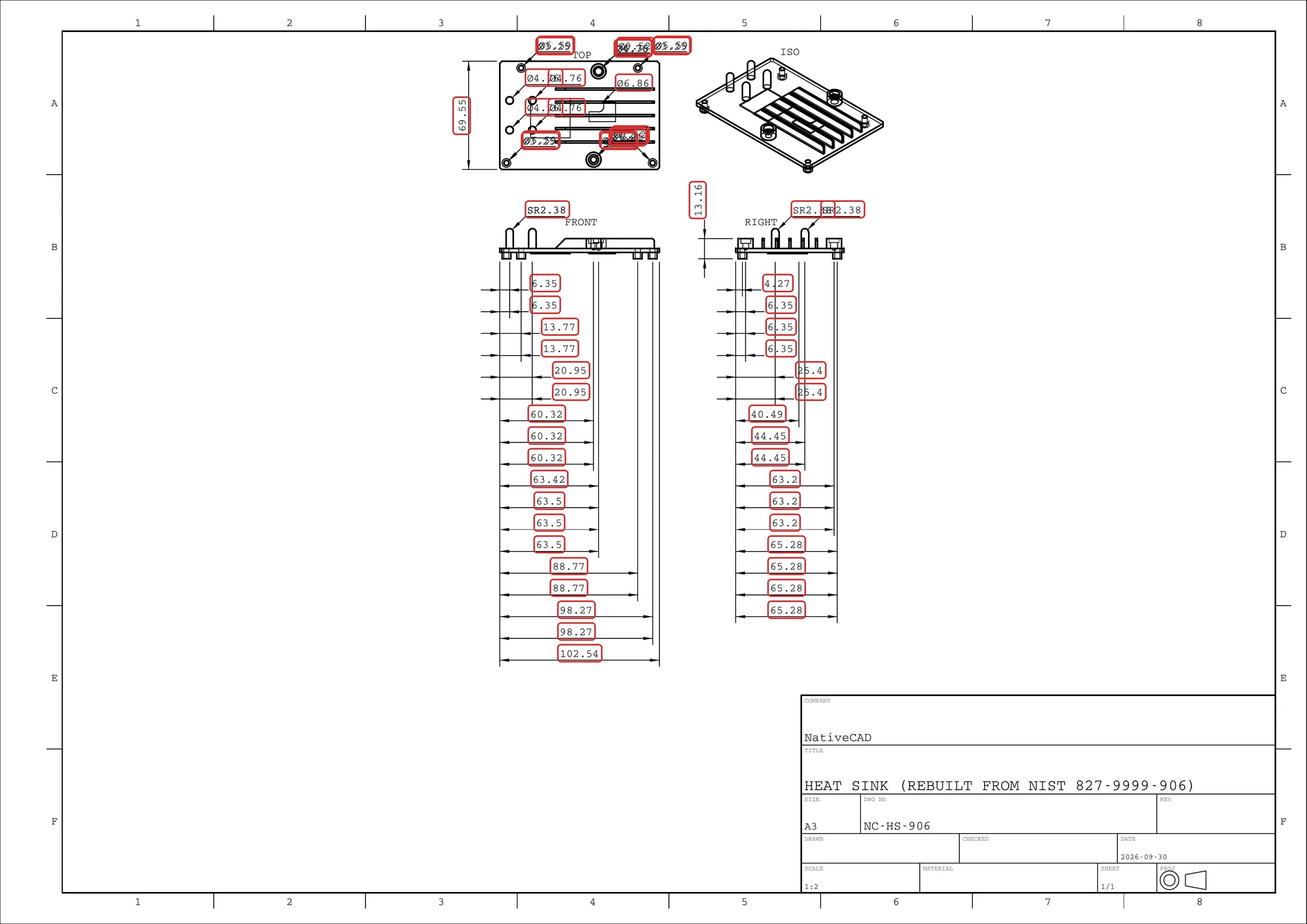 59 of 59 dimensions untoleranced
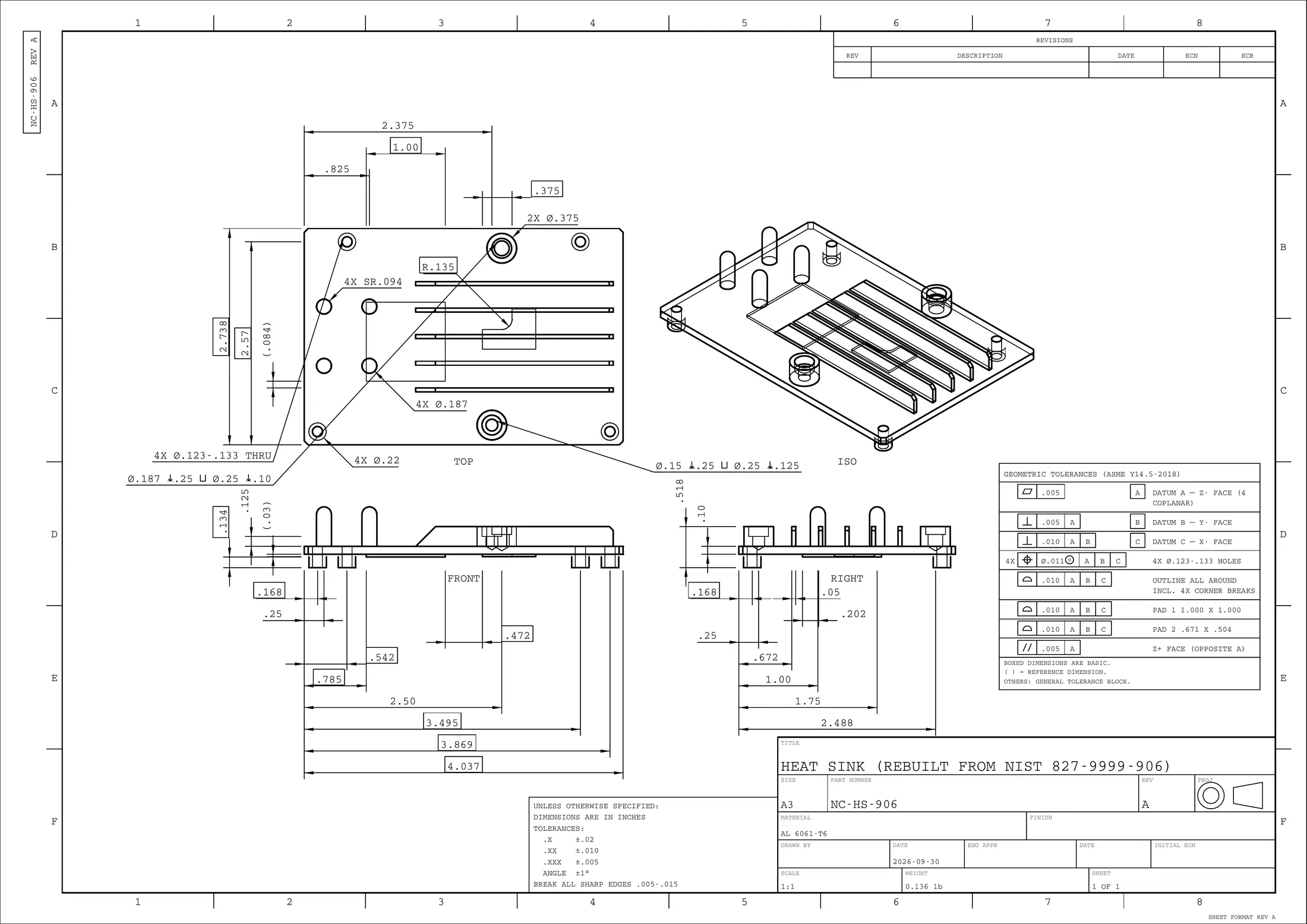 37 of 37 dimensions toleranced · 0 errors
PDF heatsink-nc-hs-906.pdf 217 KB
Every dimension toleranced
Each number on the sheet has exactly one tolerance behind it: its own, the general block, or a feature control frame. A drawing with a gap in it is caught before it leaves, not when the parts come back.
Position tolerances sized from the hardware that mates
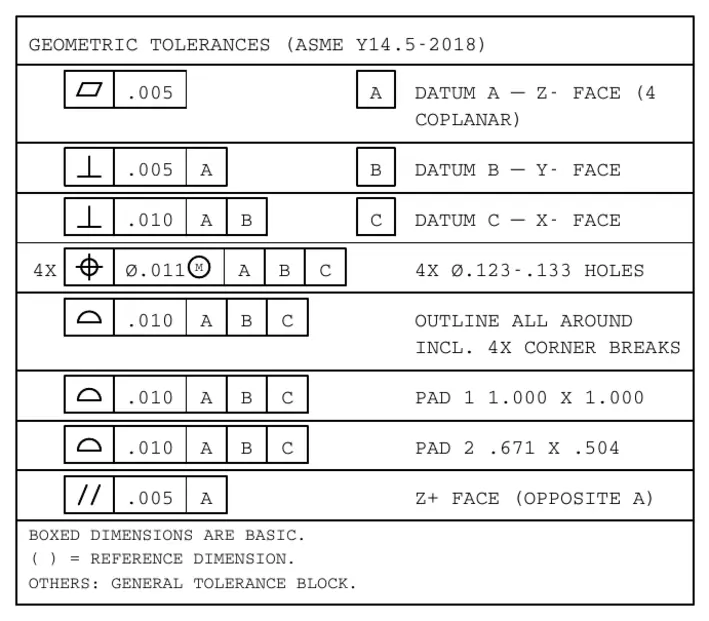
The heat sink's four mounting holes are called out for a #4 screw: ⌀.123–.133 thru, position ⌀.011 at MMC to A|B|C. Tight enough to assemble every time, open enough to quote as standard CNC work, with the wall around every hole checked.
One title and tolerance block per supplier, on every sheet
Save a shop profile once — title block, general tolerances, revision table, corner stamp — and every sheet for that supplier carries it, identically. Ready to go: ASME inch, ASME metric and ISO 2768-m.
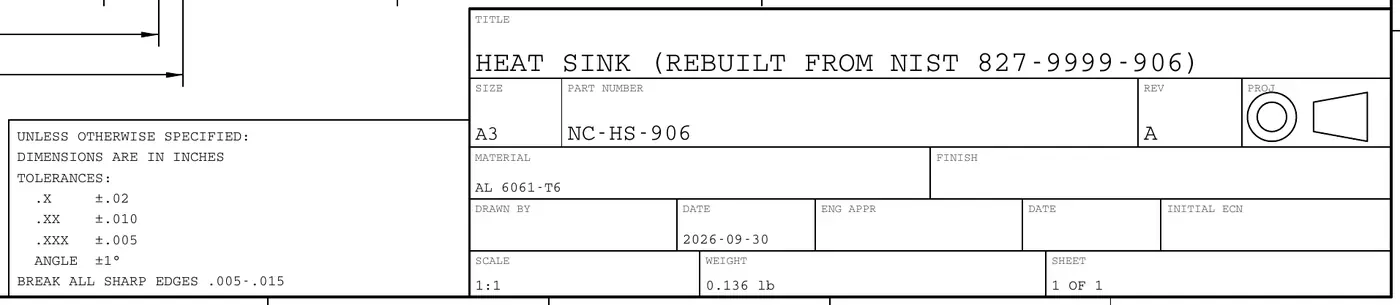
“Using the same global tolerance block on every drawing you send to the same factory matters more than it seems.”
“Keep GD&T on the mounting holes, but size the position tolerances realistically for the parts that mate.”— Manufacturing engineer, NativeCAD tester
What we shipped in response:
- Shop profiles — one saved title and general-tolerance block per supplier, stamped on every sheet.
- Hole position from the fastener — sized for the screw that mates, floating or fixed.
- Tolerance coverage — no dimension leaves without a tolerance.
- Automatic datums and profile — with the GD&T table on the sheet.
The part is the heat sink NativeCAD rebuilt from NIST's public test drawing 827-9999-906; the sheet, part number NC-HS-906 and title block are NativeCAD's. See it built from the drawing →
Wireframe — cad_export_body format:"svg" | "dxf"
Two view modes, same writers. The default is a projected wireframe of the tessellated mesh's
edges — every edge, precisely labelled. view:"hlr" (shipped 2026-08-29)
routes the already-attached tessellation through the kernel's HLR classifier
(ops/hlr.js) instead — no extra tessellation pass — and produces an actual
hidden-line-removed drafting view: visible B-rep edges and silhouettes solid, hidden edges dashed,
each occlusion-tested against the whole body by camera raycast from the chosen axis. The response
reports visibleEdgeCount/hiddenEdgeCount; the default wireframe output is
byte-identical to before this shipped.
| Option | Kind | What it does |
|---|---|---|
axis | behavior | Which world axis to project along — z (default) is a top/plan view. |
view | behavior | "wireframe" (default, unchanged) or "hlr" for the
hidden-line-removed drafting view — SVG gets a dashed hidden-edge group, DXF gets
VISIBLE/HIDDEN layers. Refused by name
(E_INVALID_ARGS) on any format other than svg/dxf. |
tolerance / maxTriangles / handle | speed | The standard tessellation dials, including mesh reuse. |
Cut paths — cad_export_body format:"contour-dxf"
Takes the boundary of the planar face facing the viewer straight off the B-rep
and writes closed contours as true LINE/ARC/CIRCLE entities
on a single CUT layer — no mesh, no facets, no text — plus bend centrelines on
BEND_UP/BEND_DOWN layers for a formed sheet-metal part. It needs a
flat-cut part (one planar face normal to the view axis, all features through), and returns
warnings naming anything it could not honour — a blind pocket, say — instead of
silently drawing it as if it were a through-cut.
| Option | Kind | What it does |
|---|---|---|
axis: "auto" | behavior | Picks the axis the part is thinnest along — the sheet normal — so you don't have to know how the part is oriented. |
side | behavior | Take the contour from the near or far face of the view axis — only matters when the two differ. |
| one body only | skips translation | Exactly one named body per file, refused otherwise — a nesting layout is the vendor's job, and pretending otherwise corrupts kerf compensation. |
DXF in — cad_import of a .dxf
The short version, with a sample to try and what the vector-PDF reader adds: DXF & PDF import. This section is the full reference.
A laser-cut drawing in, a flat part out. cad_import reads an ASCII DXF and chains
its LINE, ARC, CIRCLE, LWPOLYLINE,
POLYLINE, ELLIPSE and SPLINE curves — block
INSERTs and MINSERT arrays expanded, mirrored and non-uniformly scaled
ones included — into closed loops: an outline plus the holes nested in it. A loop inside a hole is
an island and becomes its own part. What you get is decided by the options:
| You pass | You get |
|---|---|
no thickness |
A 2D sketch in the world XY plane, and no body. Every arc is still an
arc, so extruding it (cad_extrude_profile with profile: {sketch})
sweeps it exactly. The way in for a drawing you will modify or feature further. |
thickness (mm) |
A flat part: each outer loop minus its holes, extruded +Z from z = 0,
one exact solid per outline, largest first. A hole is a real cylinder, an arc a real
cylindrical face. Each solid is named from the layer of its outline (or the file name for
layer 0), and that name is the STEP product name on the way out. |
mode:"drawing" |
The sheet read as an engineering drawing: its views (front, top, side,
iso, sections), title block and border, each view's scale and dimensions, and the projection
method with a confidence — reported, with no geometry added. A drawing kept in a paper-space
layout is read from the layout, each viewport a window onto the model at its own scale.
saveCurves writes every view's curves to a JSON file. |
| Option | Kind | What it does |
|---|---|---|
thickness | behavior | Present, it switches the import from a sketch to a flat part. Always millimetres,
whatever units says about the file's own numbers. |
units | behavior | The unit the file's coordinates are in, overriding $INSUNITS.
A file that declares nothing is read as millimetres and says so
(sourceUnits.assumed); a file drawn in inches imports scaled to millimetres. |
layers / excludeLayers | skips translation | Include and exclude lists, case-insensitive, exclude wins. Drop the dimension, construction and title-block layers before they chain into loops of their own. |
gapTol | behavior | The widest gap between two loose curve ends that is healed to close a chain, in millimetres (default 0.01). Raise it for a hand-drawn file that misses by a fraction of a millimetre. |
mode:"drawing" | behavior | Reads the sheet's views instead of building a part. thickness and
gapTol are refused with it. |
saveCurves | behavior | Drawing mode only: writes every view's curves — visible, hidden, centre, hatch, phantom, in sheet millimetres — to a JSON file and reports its path and per-view counts; the reply itself carries counts, not the thousands of curves. |
thickness, layers, excludeLayers and
gapTol belong to DXF: on any other extension they are refused by name, never silently
ignored.
Exact where the file is exact. Holes are cylinders, not N-gons. An
ELLIPSE and a control-point SPLINE (weights included) are carried as exact
B-spline edges on extruded walls. The one caveat is the fit-point-only SPLINE — a file
that stores the points the curve passes through and no control points has no exact form on disk. It
is sampled along the reader's interpolation, the loop is flagged approximated,
chain.approximatedLoops counts it and a warning names it.
Nothing is dropped silently. The report lists every layer with its entity count,
what the reader skipped by entity type (3DSOLID, 3DFACE, polyface meshes,
POINT), the gaps it healed, duplicate outline segments removed, open chains with the
gap between their ends, and any closed loop withheld because it sits inside an outline that never
closed. DIMENSION, TEXT and HATCH are read as data on the
report and never become geometry. An open chain is a warning, not a crash: the closed profiles
import and the open ones are listed, so an agent can raise gapTol or fix the drawing.
In the modeler. Open… (or drag and drop) a .dxf and the
dialog shows what the file holds before anything is built: a preview of the closed profiles and the open chains,
the units the header declares, and under them the size the header claims next to the size the drawing itself
measures — a stale header, or a wrong unit, is called out before you press Import. A file that looks like a
sheet (a title block, views placed in projection, a paper-space layout with viewports) is offered
Read as a drawing; it never switches for you, and Part or sketch stays one click away. In drawing
mode a Sheet box reads the model space or any paper-space layout, and Add summary to the log,
Copy summary and Download JSON keep what it found: views, projection, scale, title block and layers,
as data, the same bytes for the same file and options. The summary is not saved with the project — download
it to keep it.
| Refusal | When |
|---|---|
DXF_NO_CLOSED_PROFILE |
Nothing closed: all open chains, an empty layer filter, or only loops inside an unclosed outline. The detail names the gap that would close the outline. |
DXF_EXTRUDE_FAILED |
A profile chained but could not be swept into a solid. The whole import is refused — a flat part with an island missing is worse than no part. |
DXF_UNREADABLE | The file could not be read from disk. |
DXF_BINARY | A binary DXF; re-save it as ASCII. |
DXF_IS_DWG |
A DWG with a .dxf name. DWG is a closed format and is not read. |
DXF_NOT_DXF | Text that is not a DXF group-code stream. |
DXF_NO_VIEWS |
Drawing mode found nothing that can be a view: every curve is border, title block or annotation. |
Out of scope, by name: 3D entities (counted, not converted), binary DXF and DWG, splitting curves at T-junctions (a drawing built from crossing lines is trimmed first), and more than one thickness per import — bends and different gauges belong to the sheet-metal verbs. Only the model space builds a sketch or a flat part.
PDF drawing in — cad_import of a .pdf
The short version, with the DXF reader beside it: DXF & PDF import. This section is the full reference.
Most manufacturer and datasheet drawings are vector PDFs: the outlines are exact
path operators and the dimensions are real text. NativeCAD reads one page of one as a
drawing, not a picture, and answers exactly what the same sheet as a DXF answers — so a
supplier's PDF is something you can ask questions of instead of something you look at. The
.pdf here is a flat drawing: a 3D PDF's embedded model (the
PRC the pdf writer produces) is not read.
- Exact outlines. Lines, arcs and circles come back as
LINE,ARCandCIRCLErecords in sheet millimetres. A PDF has no arc operator, so an arc is recovered from the Béziers it is drawn with; any other Bézier stays an exact cubicSPLINE, never a polygon. Measured against drawings NativeCAD makes itself, every visible segment comes back within 0.001 mm on the sheet. - The sheet's structure. The views (front, top, side, iso, sections, details), where each sits, first or third angle with a confidence, and each view's own scale, recovered from its dimensions.
- The annotation. Every dimension value (
60,Ø8,R4.75,2X Ø2.5,30±0.1,45°) paired with its own dimension lines, the title block's fields, the notes and the border. - The line roles. The PDF's own optional-content layers when it has them; when it has none, the stroke style: dashed is a hidden line, chain is a centre or phantom line, and a thin continuous stroke is annotation, so dimension lines never become views of their own.
| Option | Kind | What it does |
|---|---|---|
mode:"drawing" | behavior | Required for a .pdf: without it the import is refused by name at validation, with the
fix. Reads the page's views, title block and border as a report and adds nothing to the document — no
sketch, no body (the reply carries drawingId). |
page | behavior | The 1-based page, default 1: a drawing set has one sheet per page. Past the end is
PDF_PAGE_RANGE, with the page count. Refused on any other extension. |
units | behavior | "mm" or "in": the unit the dimension text is written in. The sheet
itself is always paper millimetres (PDF user space is 1/72 in by definition). Default: a note on the
sheet (ALL DIMENSIONS IN INCHES), else millimetres — and the choice is reported
(sourceUnits). Anything else is refused: PDF_BAD_UNITS in the modeler and in-process,
at validation from cad_import. |
layers / excludeLayers | skips translation | Include and exclude lists on the reader's layer names — the PDF's own, else the stroke-style
names (CONTINUOUS_0.50, DASHED_0.25, …) — case-insensitive, exclude wins. |
saveCurves | behavior | As for a DXF sheet: writes every view's curves — visible, hidden, centre, hatch, phantom, in sheet millimetres — to a JSON file and reports its path and per-view counts; the reply itself carries counts, not the thousands of curves. |
thickness, gapTol, space and layout belong to
DXF: with a .pdf they are refused by name, never silently ignored — a PDF is a drawing, not a cut
path, and it has pages, not model and paper space.
Nothing is dropped silently. The report gives the page (index, count, size, rotation), every layer with its role, the reader's own scale vote, the unit the dimension text came from, and what the reader skipped and counted: filled-only paths, clipping paths, images, shadings, invisible OCR text. A page that is a scan is not guessed at from pixels.
In the modeler. Open… (or drag and drop) a .pdf and it opens straight in the
drawing panel: page 1, with a Page box for the others, the same views table and title block a DXF sheet
gets, and Add summary to the log, Copy summary and Download JSON to keep what it found. It
is read-only: nothing is added to the model. A refusal appears in the dialog with its code.
From Claude, cad_import reads a .pdf from the first plugin release that
carries the page field (tool schema 1.42.0); until you have that release, use the modeler.
| Refusal | When |
|---|---|
PDF_RASTER_ONLY |
The page is a scan or a rendered picture: images and no vector line work. There is no exact geometry to read and none is guessed; any invisible OCR text is on the detail. Ask for the vector PDF, a DXF or a STEP, or try another page — one of them may be vector. |
PDF_NO_VECTOR |
The page has text but no stroked line work: a notes or parts-list page, or a drawing whose outlines are solid filled shapes. |
PDF_NO_VIEWS |
Line work, but none of it can be a view: all border, title block or annotation, or a layer filter that left nothing. |
PDF_EMPTY_PAGE | Nothing on the page at all. |
PDF_PAGE_RANGE |
page is past the end of the file; the message gives the page count (over MCP the
page field is refused with E_INVALID_ARGS). |
PDF_ENCRYPTED |
An encrypted PDF — even one that only restricts printing or editing. Re-save or print it to an unsecured PDF. |
PDF_NOT_PDF | No %PDF- header: not a PDF. |
PDF_NO_PAGES | No page tree and no page objects: a damaged or truncated file. |
PDF_MALFORMED | The file could not be parsed at all; the message says where the reader stopped. |
PDF_UNREADABLE | The file could not be read from disk. |
PDF_BAD_UNITS |
units other than mm or in (the modeler's and the in-process refusal;
cad_import refuses it at validation). |
Out of scope, by name: a 3D PDF's embedded PRC / U3D model, text drawn as outlines (a title block set in
outlined glyphs has no fields), images and shadings (counted, not traced). On a sheet whose dimension text is in
inches, a view's scale measured from its dimensions reads them as millimetres and comes out 25.4× too large; a
warning says so, and a title-block SCALE stands. Rebuilding the part from its views is the drawing →
STEP step, not this import.
Try it
CUT DXF nativecad-plate-cutpath.dxf 1.4 KB DXF nativecad-plate.dxf 365 KB SVG nativecad-plate.svg 300 KB

The size gap tells the story: the sample plate's cut path is 6 closed contours in 13 entities — 1.5 KB of arcs and circles a vendor's CAM reads directly — while the wireframe of the same part is thousands of tessellated edges.
DXF import is an import-only spoke, so it has no kernel-authored sample of its own. Its
round-trip input is the cut path above: hand nativecad-plate-cutpath.dxf to
cad_import with thickness: 6 and the sample plate comes back — one
watertight solid, 20 faces, 12,293.80 mm³, the five holes real cylinders, named
CUT from its layer. tests/test_dxf_import.js asserts the same round trip
on the kernel's own plate: volume within 1e-6, the same face and hole counts.
docs/DRAWINGS.md in the repo is the full reference. On the read
side, docs/DXF_IMPORT.md is.